


Description
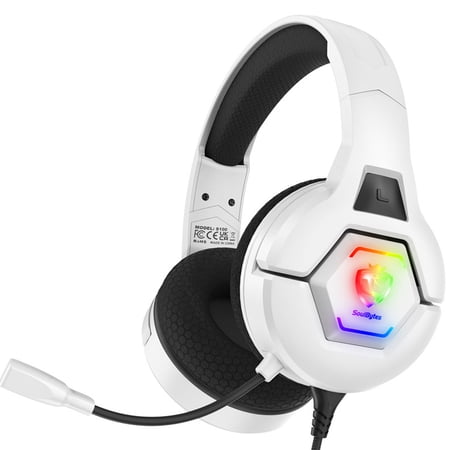
Premium Gaming Headset for PS5 PS4 Xbox PC Switch & Mobile Devices Experience immersive gaming with this wired gaming headset one of the most popular gaming headphones among players. Designed for superior comfort high-quality 7.1 stereo sound and crystal-clear noise-canceling microphone this over-ear gaming headphone elevates every FPS RPG and MMO gaming session. Perfect for long hours of gameplay online chat streaming and music playback. Key Features of This Gaming Headset Multi-Platform Compatibility: Works with PS5 PS4 Xbox Series X/S Xbox One PC Laptop Nintendo Switch iPad Tablets Smartphones and other devices with a 3.5mm audio jack. High-Quality Audio: Advanced stereo drivers deliver deep bass crisp highs and immersive 7.1 surround sound for realistic gaming audio. Noise-Canceling Microphone: Omnidirectional microphone with premium noise isolation picks up your voice clearly while reducing background sounds for precise team communication. Ergonomic Comfort: Adjustable padded headband and protein memory foam ear cushions provide all-day comfort for long gaming sessions. Stylish & Functional Design: RGB LED lights add a gamer aesthetic quick-mute button allows easy mic control and the retractable microphone is perfect for solo gaming or listening to music. Easy Volume Control: One-finger inline volume adjustment lets you manage game and chat audio effortlessly. Device-Specific Setup & Usage Xbox One New Xbox One: Connect directly to the 3.5mm jack on the controller. Old Version Xbox One: Requires a Microsoft adapter (not included) to connect. Set Headset Chat Mixer to 80% via system settings → Audio → Headset Chat Mixer. PS4 Double Channels: Reset audio to double channel if headset audio is only on one side. Go to Settings → Devices → Audio Devices → Output Device → Headset Connected to Controller. Mic Level: Adjust microphone input to 80% and output to headphones → All Audio. PC Use the included Y-splitter cable: 1 pin for microphone port 1 pin for audio port. Open computer taskbar → Speaker Icon → Control Panel → Voice Settings to configure mic and audio levels. Nintendo Switch Download the Nintendo online chat app on your smart device and sign in with your NS membership account. Follow the prompt → select Start → Start Voice Chat . For detailed settings contact Nintendo Switch support or customer service. Why Choose This Gaming Headset With over-ear comfort RGB LED lighting noise-canceling microphone and multi-platform compatibility this gaming headphone is perfect for competitive gamers casual players streamers and music lovers alike. Enjoy crystal-clear communication immersive sound and a professional gaming experience on PS5 PS4 Xbox PC Switch or mobile devices.


Reviews
There are no reviews yet.