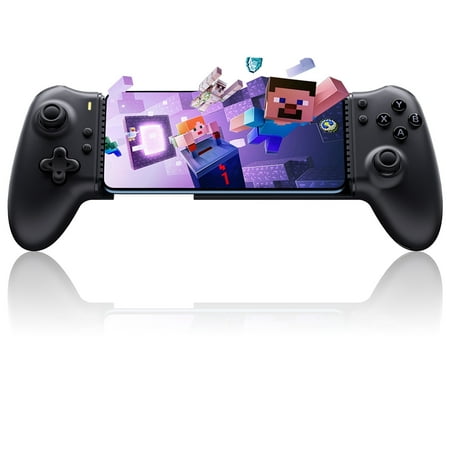
Description
EasySMX 2025 New Version M15 Bluetooth Mobile Gaming Controller feature Bluetooth 5.3 technology help to guarantee a dependable connection. The phone controller is compatible with most devices that support Bluetooth connection including Android iPhone/iPad Switch console and windows PC turn your phone into a Gaming Console – Play Xbox Swtich and PC. You can play any games and game platforms that natively support controllers on mobile phones like Xbox Game Pass Steam Link Google Play MFi Apple Arcade GeForce Now Luna and other platforms and games such as Call of Duty Fortnite Roblox Minecraft etc. The iPhone controller for gaming with full Mechanical Buttons provide crisp tactile feedback upgraded Hall Joysticks no drift no dead zone. Upgraded micro vibration motor extremely high speed stronger and more delicate vibration supports native games with vibration signals through the streaming platform. Additional this mobile controller android also adds two additional extended programmable function button M1/M2 can be more customizable gameplay easy combos. And the optimized ergonomics grip laser engraved anti-slip texture ensure there is no hassel and burden on the wrist while long-time gaming. The easy Bluetooth connectivity instructions is provided (package included) helping you to pair the controller with your device quickly. · There are 4 modes and connections can be selected: 🎮HID Mode (Press FN + Menu button for 2 seconds- Bluetooth Name: EasySMX M15) The indicator will light up as Yellow if connected. This mode is best for Android native controller games and is the default recommendation for native games. 🎮XBOX Mode (Xinput) (Press FN + X for 2 seconds-Bluetooth Name: Xbox Wireless Controller) The indicator will light up as White if connected. This mode is suitable for playing streaming Link games and console-ported games and the controller vibration works normally in this mode. 🎮Apple Mode (Press FN + B for 2 seconds-Bluetooth Name: Wireless Controller) The indicator will light up as Green if connected. This mode is suitable for streaming games. 🎮Switch Mode (Press FN + A-go to Controller>Change Grip/Order to initiate pairing) The indicator will light up as Red if connected. This mode supports Switch emulators and consoles supports native vibration no motion sensors.
Reviews
There are no reviews yet.