


Description
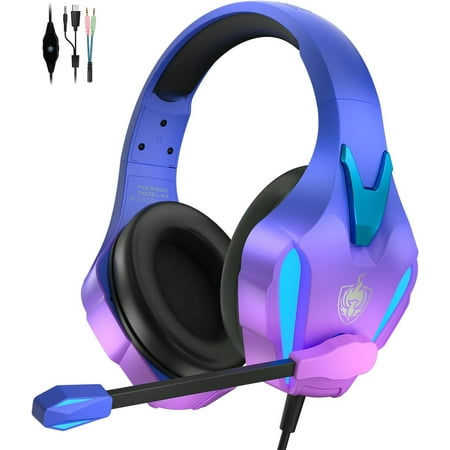
This is one of the boys favorite gaming headset Enhance your overall gaming experience [COMPATIBLE WITH CONSOLES TABLETS AND CELL PHONES] The headband is compatible with 3.5 mm input. It is easily connected to the audio input of any mobile device tablet phone laptop video game control etc. With the 3.5mm bidirectional adapter cable you can make double connection on your PC (Please note you need an extra Microsoft Adapter when connect with an old version Xbox One controller). [EXTERNAL NOISE CANCELLATION] The sound quality is perfect. One-finger volume control. It is an ergonomic design that adapts to your ears with protective pads that keep the sound clean. [SPECIAL DESIGN] Adjustable padded headband that works perfectly to give you the best gaming experience. It has a microphone with the highest sensitivity to give clear messages. You will be heard clearly. [COMFORTABLE AND FASHIONABLE] gaming headset. Gamers play games for many hours so the comfort is also a key factor when choosing a headset. We know what you need we have tested our headsets and every player will enjoy the optimal wearing comfort headset. [HIGH QUALITY MICROPHONE] Chat with your friends or retract back in the headphone to play solo and listen to music on-the-go. The quick-mute button allows you to easily silence yourself whether you re in a game or on a call. How to use online-chat on NS: Download a app → on smart device → sign in NS membership account. Smart device→ receiving the prompt asking→ select “Start”→ “Start voice chat” For more the detail setting on switch we suggest you contact NS customer support or contact our customer service. When Connecting to an Xbox One. ★New Xbox One (with a 3.5mm interface on controller)→ directly matched with this headset. ★★ Old Version Xbox One (without a 3.5mm interface on controller) → need an extra Adapter (Not Included) to match with this headset. ★★★ 80% Headset Chat Mixer Open the system setting → Audio → Headset chat mixer → adjust it into 80% When Connecting to a PS4. ★ Double Channels Setting (The Default Channel of the PS4 is Mono. If the headset can be only heard the sound of one side. Please reset it into Double Channels.) ★ Mic Sound Testing Click the Settings icon → Devices → Audio Devices a.Output Device → choose Headset Connected to Controller b.Adjust Microphone Level → adjust it into 80% c.Output to Headphones → choose All Audio When Connecting to a PC. 1.The Y Splitter Adapter is needed(1 pin for Mic port 1 pin for Audio port) 2. Computer Taskbar → Speaker Icon → Control Panel →Setting the Voice


Reviews
There are no reviews yet.